SSO Integration Guide
OAuth 2.0 Authorization Code + PKCE for third-party applications.
Login with BuildGara is BuildGara's OAuth 2.0 single sign-on (SSO) service. Your app redirects users to BuildGara to authenticate, then exchanges a one-time authorization code server-to-server for an access token and the user's verified profile — name, username, email and role — with PKCE protecting every step.
- 1. Register a client to get a
client_idandclient_secret - 2. Redirect users to
/oauth/authorizewith PKCE +state - 3. Exchange the code at
POST /api/oauth/token(server-to-server) - 4. Fetch the profile from
GET /api/oauth/userinfoand create a local session
Add "Login with BuildGara" to your application. BuildGara acts as the identity provider — it authenticates your users and hands you a verified profile (name, username, email, role) through a standard OAuth 2.0 authorization-code flow with PKCE.
1. How it works at a glance
This guide explains how to add "Login with BuildGara" (single sign-on) to your application. BuildGara acts as the identity provider (IdP) — it authenticates your users and hands you a verified profile (name, username, email, role) through a standard OAuth 2.0 authorization-code flow with PKCE support.
OAuth 2.0 Architectural Roles Diagram
High-resolution visual representation of system component interactions
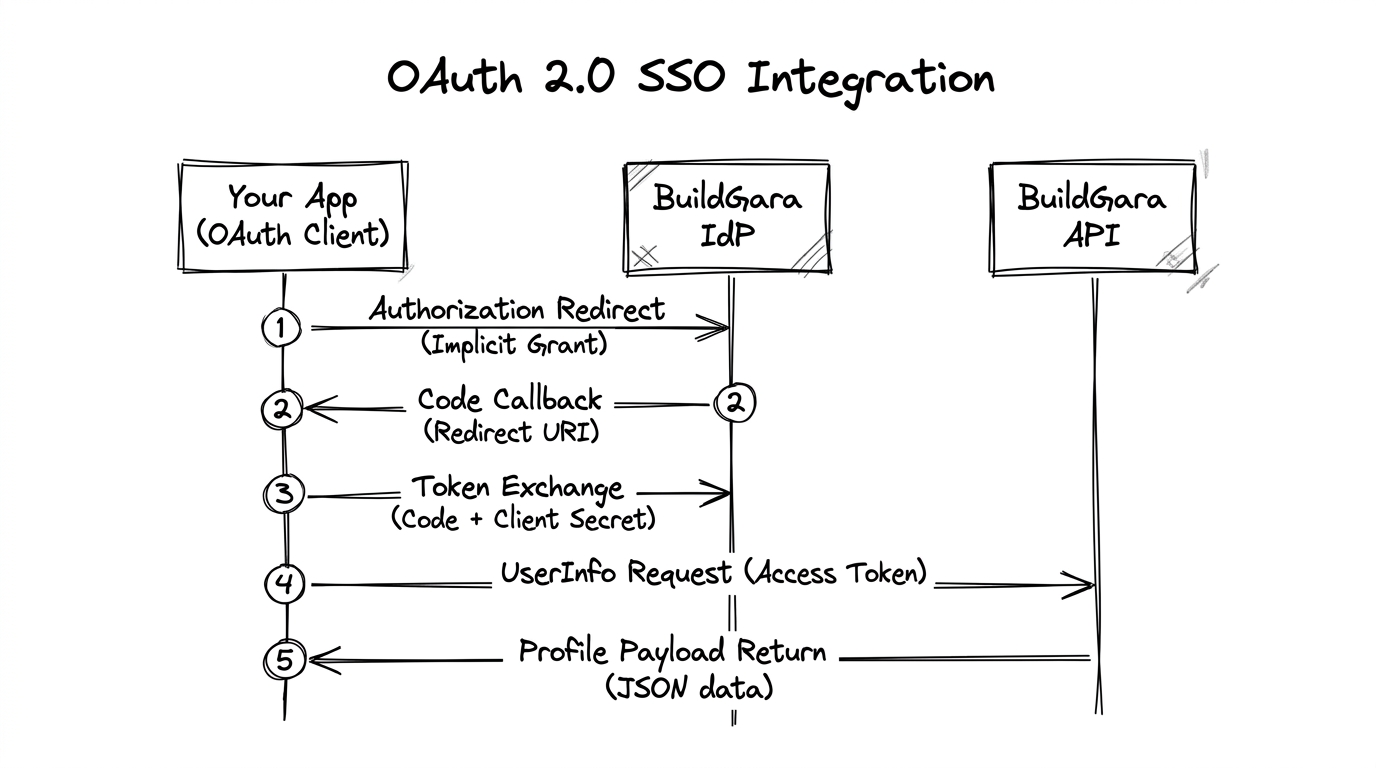
Protocol Step Breakdown
Browser redirects to BuildGara with client_id, PKCE code_challenge & state
After authentication & consent, BuildGara redirects browser back with authorization code
Server-to-server POST with code, client_secret & PKCE code_verifier
App sends Bearer access_token to request user claims
BuildGara API returns canonical profile (sub, name, email, role)
The user's BuildGara password is never shared with your app. The authorization code is exchanged server-to-server, so your client_secret stays secret. PKCE binds the code to the browser session that started the login; state blocks login-CSRF. Trusted/official apps skip the consent screen; every other app shows a consent page before approving.
What your users experience
Click
"Login with BuildGara" in your app
Sign in
At BuildGara if they aren't signed in yet
Consent
Review & approve (non-trusted apps only)
Redirect
Back to your redirect URI — with a code
Session
Your app now has a verified identity
2. Prerequisites
- A running instance of your app with a registered Redirect URI (see section 3).
- A BuildGara account to register the application.
- The same endpoints below work from local development too — point your app at
https://buildgara.com/https://api.buildgara.comand it just works.
Not supported today (enforced by the server)
| Capability | Status |
|---|---|
response_type | only code |
| PKCE method | only S256 |
| Grants | authorization_code only — no client_credentials, no refresh-token grant |
| Token lifetime | access token 1 hour · auth code 5 minutes, single-use |
Plan around the 1-hour access token
No refresh token is issued. Keep your own long-lived session and re-run the login flow (silently — users usually stay signed in to BuildGara) when the token nears expiry.
3. Register your application
3.1 Through the UI (recommended)
- Log in to BuildGara.
- Open Settings → Developer Apps.
- Click Register Sub-App and fill in:
- App Name (required) — shown to users on the consent page.
- Redirect URIs (required, one per line) — where users land after login, e.g.
https://myapp.com/callbackorhttps://dev.myapp.com/callback(add a separate dev URI if you need one). - App Description — short text shown on the consent page.
- Click Create Sub-App. A dialog shows your credentials once:
CLIENT ID:      bg_client_a1b2c3d4e5f6g7h8i9j0k1l
CLIENT SECRET:  bg_sec_xxxxxxxxxxxxxxxxxxxxxxxxxxxxxxxx
Save the secret immediately
BuildGara stores only a hash and will never show it again. Lost it? Use Regenerate Secret — the old secret dies instantly.
Every registered app appears in your list with its Client ID and allowed Redirect URIs, plus a "Test SSO Auth" link to sanity-check the flow.
Who sees what: non-admin users manage only their own apps. Admins see all apps (Admin panel → SSO Sub-Applications) and can mark an app Trusted — trusted apps auto-approve and skip the consent screen (used for official BuildGara sub-apps).
3.2 Through the API
All calls require a logged-in user (Authorization: Bearer <accessToken>). The secret is returned only once.
curl -X POST https://buildgara.com/api/oauth/clients \
  -H "Authorization: Bearer <accessToken>" \
  -H "Content-Type: application/json" \
  -d '{
    "name": "My Analytics App",
    "redirectUris": ["https://myapp.com/callback", "https://dev.myapp.com/callback"],
    "description": "Charts and dashboards",
    "logoUrl": "https://myapp.com/logo.png"
}'{
"success": true,
"client": {
"id": 12,
"name": "My Analytics App",
"clientId": "bg_client_a1b2c3d4e5f6g7h8i9j0k1l",
"clientSecret": "bg_sec_xxxxxxxxxxxxxxxxxxxxxxxxxxxxxxxx",
"redirectUris": ["https://myapp.com/callback", "https://dev.myapp.com/callback"],
"description": "Charts and dashboards",
"isTrusted": false,
"createdAt": "2026-09-03T10:00:00.000Z"
}
}| Operation | Method & path | Notes |
|---|---|---|
| List my apps | GET /api/oauth/clients | Secret always omitted |
| Create app | POST /api/oauth/clients | Secret in response once |
| Regenerate secret | POST /api/oauth/clients/:id/regenerate-secret | New secret shown once; old one dies |
| Delete app | DELETE /api/oauth/clients/:id | Users of that app can no longer log in |
Redirect URI matching rule
A redirect URI is accepted when it matches a registered URI on origin + pathname (query string ignored). Keep the registered URI and the URI you send identical.
4. Endpoints reference
| Endpoint | Method | Purpose |
|---|---|---|
{web}/oauth/authorize | GET | Login + consent page (frontend route) — send your users here |
{api}/api/oauth/authorize/details | GET | Validate client_id + redirect_uri, read app metadata |
{api}/api/oauth/authorize | POST | Submit user consent (requires a logged-in user) |
{api}/api/oauth/token | POST | Exchange the authorization code for tokens |
{api}/api/oauth/userinfo | GET | Fetch the authenticated user's profile (Bearer token) |
{api}/api/oauth/.well-known/openid-configuration | GET | OIDC discovery document |
{api}/api/oauth/clients | GET / POST | Manage your registered apps |
Base URLs
The same in every environment (local development included): web = https://buildgara.com (/oauth/authorize for the web route) · api = https://api.buildgara.com (/api/oauth/...). The discovery document advertises the endpoints dynamically: GET {api}/api/oauth/.well-known/openid-configuration.
5. The login flow
OAuth 2.0 + PKCE Protocol Sequence Diagram
High-resolution visual sequence diagram of end-to-end lifecycle
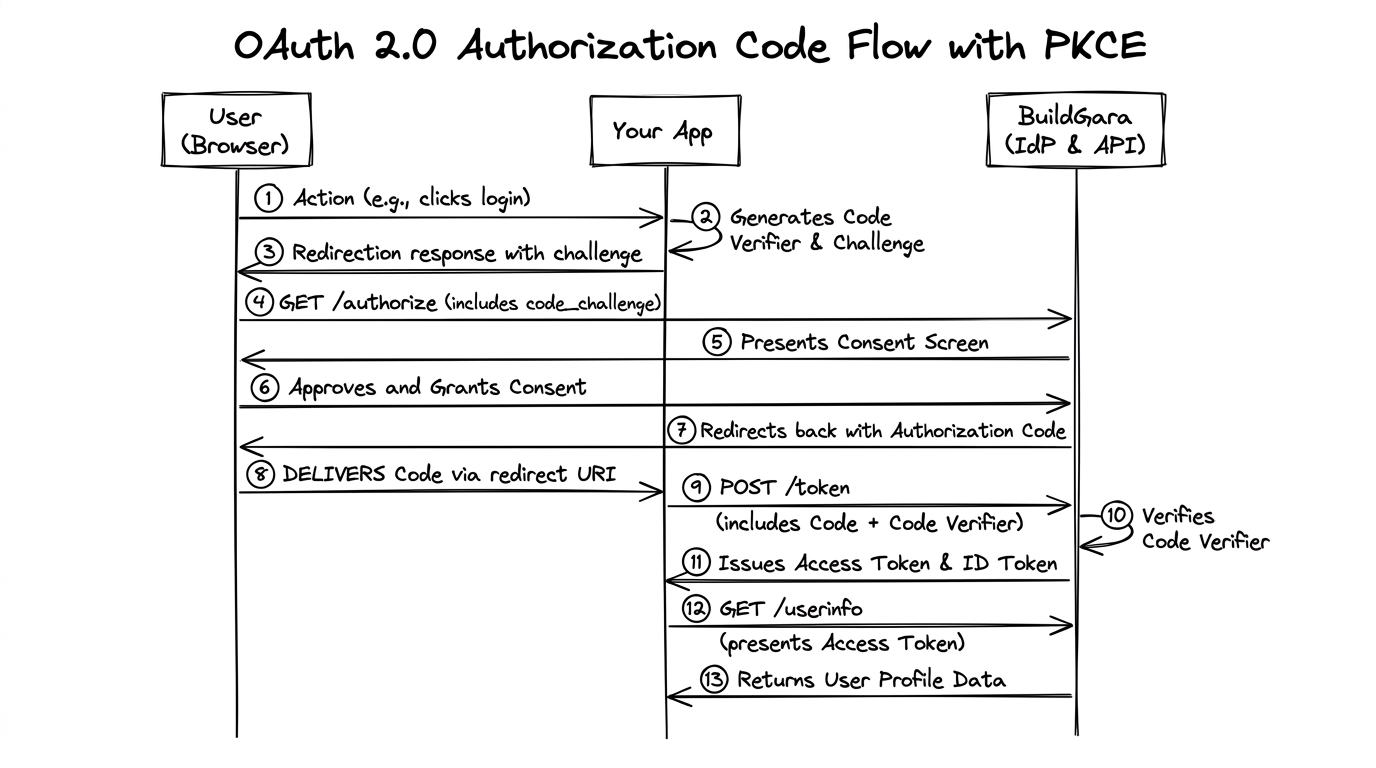
Steps in plain English
- Start — your server generates a random
stateand a PKCEcode_verifier, stores them, computescode_challenge = base64url(sha256(code_verifier)), then redirects the browser to the authorize page. - Authenticate & consent — BuildGara signs the user in (if needed) and shows a consent screen (unless the app is trusted). On approval, the browser is redirected back with
?code=...&state=.... The code is valid 5 minutes and is single-use. - Exchange — your server POSTs the code + credentials +
code_verifierto the token endpoint and receives anaccess_token(1 hour) and anid_token. - Identify — your server calls UserInfo for the canonical profile, then creates/updates its local user + session.
6. Protocol walkthrough
6.1 Start login (authorization request)
Send the user's browser to GET {web}/oauth/authorize:
| Parameter | Required | Value / notes |
|---|---|---|
client_id | ✅ | Your bg_client_... id |
redirect_uri | ✅ | Exactly one of your registered URIs |
response_type | ✅ | Must be code |
scope | optional | Default openid profile email role |
state | ✅ recommended | Random string you store; returned unchanged |
code_challenge | ✅ recommended | base64url(sha256(code_verifier)) |
code_challenge_method | when challenge sent | S256 |
nonce | optional | Accepted; informational |
https://buildgara.com/oauth/authorize?client_id=bg_client_a1b2c3d4e5f6g7h8i9j0k1l&redirect_uri=https%3A%2F%2Fmyapp.com%2Fcallback&response_type=code&scope=openid%20profile%20email%20role&state=9f8f0f2e3c4b5a6d&code_challenge=YJk8fVkn9yFhQm2cR8gD4sW6xZ0bL3tN7pQ1uV5yA9c&code_challenge_method=S256Redirect back — success:
https://myapp.com/callback?code=bg_code_1a2b3c…&state=9f8f0f2e3c4b5a6dRedirect back — user denied:
https://myapp.com/callback?error=access_denied&error_description=User%20denied%20access&state=9f8f0f2e3c4b5a6dConsent & trusted apps
Trusted/official apps (e.g. BuildGara's own sub-apps) are approved automatically and skip the consent screen. Non-trusted apps always see the consent page listing the app name, logo, description and the scopes being granted.
6.2 Handle the callback
- Check
error— if present, the user cancelled or something failed. Do not log them in; show a friendly message. - Verify
state— must equal the value you stored in 6.1. If not, abort immediately (possible CSRF). - If everything checks out, read
codeand exchange it.
6.3 Exchange the code for tokens
Server-to-server — never from browser JS (it contains your secret):
POST /api/oauth/token
Content-Type: application/json

{
  "grant_type": "authorization_code",
  "code": "bg_code_1a2b3c…",
  "client_id": "bg_client_a1b2c3d4e5f6g7h8i9j0k1l",
  "client_secret": "bg_sec_xxxxxxxxxxxxxxxxxxxxxxxxxxxxxxxx",
  "redirect_uri": "https://myapp.com/callback",
  "code_verifier": "the-exact-verifier-you-generated-at-login-start"
}
The server verifies your client_secret (bcrypt), rejects codes that are expired (> 5 min) or already used, and — when the code carries a PKCE challenge — requires base64url(sha256(code_verifier)) to match. Then it marks the code used and returns:
{
  "access_token": "eyJhbGciOiJIUzI1NiIs…",
  "token_type": "Bearer",
  "expires_in": 3600,
  "id_token": "eyJhbGciOiJIUzI1NiIs…",
  "scope": "openid profile email role"
}
No refresh token is issued
Re-run the flow when access_token expires (silent re-login works well, since users usually stay signed in to BuildGara).
6.4 Fetch the user profile (UserInfo)
GET /api/oauth/userinfo
Authorization: Bearer <access_token>{
"sub": "42",
"name": "Anisha Sharma",
"preferred_username": "anisha",
"email": "anisha@example.com",
"email_verified": true,
"role": "founder",
"avatar": "https://…/avatar.jpg",
"country": "Nepal",
"city": "Kathmandu",
"is_founder": true,
"is_investor": false,
"is_provider": false
}| Claim | Meaning |
|---|---|
sub | Stable, unique BuildGara user id — use this as your external user key |
name | Display name (fullName) |
preferred_username | Username (may change; don't key accounts on it) |
email | Verified primary email |
role | Current role string (admin, founder, investor, provider, ...) |
avatar / country / city | Profile extras |
is_founder / is_investor / is_provider | Capability flags |
Error responses are JSON with error / error_description, e.g. 401 invalid_token, 404 user_not_found.
The id_token
An OIDC-style JWT (iss, sub, aud, exp, name, preferred_username, email, role, ...) is returned alongside the access token. It is signed with HS256 using the platform's symmetric secret, which third parties cannot use to verify. Treat it as informational — validate identity via UserInfo.
6.5 Create your session
- Look up your local user by
sub(or create one on first login); refresh display fields from UserInfo. - Prefer
subover email for account keys — emails can be re-verified or claimed. - Keep
access_tokenserver-side (memory / encrypted store). Never in browser localStorage unless you accept XSS exposure. - Implement your own logout. BuildGara does not broadcast logout to third-party apps; if users must also leave BuildGara, link to BuildGara's logout and re-run the flow on next login.
7. Scopes & claims reference
| Scope | What the app receives |
|---|---|
openid | Base OIDC marker (sub) |
profile | name, preferred_username, avatar, country, city |
email | email, email_verified |
role | role, is_founder, is_investor, is_provider |
Default scope string: openid profile email role — grants the profile shown on the consent screen:
This application will receive:
- Basic Profile Information (Name, Username, Avatar & Country)
- Primary Email Address
- BuildGara User Role & Ecosystem Verification Status
8. Reference implementations
8.1 cURL walkthrough
# 1. Open this URL in a browser (manual step) — copy the code from the redirect
https://buildgara.com/oauth/authorize?client_id=bg_client_xxx&redirect_uri=https://myapp.com/callback&response_type=code&scope=openid%20profile%20email%20role&state=abc123# 2. Exchange the code (against the production API)
curl -X POST https://api.buildgara.com/api/oauth/token \
-H "Content-Type: application/json" \
-d '{
"grant_type": "authorization_code",
"code": "bg_code_...",
"client_id": "bg_client_xxx",
"client_secret": "bg_sec_...",
"redirect_uri": "https://myapp.com/callback"
}'# 3. Fetch the profile
curl https://api.buildgara.com/api/oauth/userinfo \
-H "Authorization: Bearer <access_token_from_step_2>"Testing locally? No changes needed — the same https://buildgara.com and https://api.buildgara.com endpoints work from local development as well.
8.2 Node.js / Express
Complete, production-shaped flow with state (in an httpOnly cookie) and PKCE:
import crypto from "node:crypto";
import express from "express";

const app = express();
app.use(express.json());

const CLIENT_ID = process.env.BG_CLIENT_ID;              // bg_client_…
const CLIENT_SECRET = process.env.BG_CLIENT_SECRET;      // bg_sec_… (server only!)
const REDIRECT_URI = process.env.BG_REDIRECT_URI;        // https://myapp.com/callback

const WEB_BASE = process.env.BG_WEB_BASE || "https://buildgara.com";
const API_BASE = process.env.BG_API_BASE || "https://api.buildgara.com";

const b64url = (buf) => Buffer.from(buf).toString("base64url");

// 1. "Login with BuildGara" button -> /login/buildgara
app.get("/login/buildgara", (_req, res) => {
  const state = b64url(crypto.randomBytes(16));                 // CSRF token
  const codeVerifier = b64url(crypto.randomBytes(48));          // PKCE verifier (43-128 chars)
  const codeChallenge = b64url(
    crypto.createHash("sha256").update(codeVerifier).digest()
  );

  const params = new URLSearchParams({
    client_id: CLIENT_ID,
    redirect_uri: REDIRECT_URI,
    response_type: "code",
    scope: "openid profile email role",
    state,
    code_challenge: codeChallenge,
    code_challenge_method: "S256",
  });
  res.cookie("bg_oauth_state", state, { httpOnly: true, sameSite: "lax", secure: process.env.NODE_ENV === "production" });
  res.cookie("bg_oauth_verifier", codeVerifier, { httpOnly: true, sameSite: "lax", secure: process.env.NODE_ENV === "production" });
  res.redirect(`${WEB_BASE}/oauth/authorize?${params}`);
});

// 2. BuildGara redirects the browser here with ?code=...&state=...
app.get("/api/auth/buildgara/callback", async (req, res) => {
  const { code, state, error } = req.query;

  if (error) return res.status(400).send(`Login failed/cancelled: ${error}`);
  if (!code || state !== req.cookies.bg_oauth_state) {
    return res.status(400).send("Invalid or expired state — possible CSRF. Try logging in again.");
  }
  const codeVerifier = req.cookies.bg_oauth_verifier;

  // 3. Server-to-server token exchange
  const tokenRes = await fetch(`${API_BASE}/api/oauth/token`, {
    method: "POST",
    headers: { "Content-Type": "application/json" },
    body: JSON.stringify({
      grant_type: "authorization_code",
      code,
      client_id: CLIENT_ID,
      client_secret: CLIENT_SECRET,
      redirect_uri: REDIRECT_URI,
      code_verifier: codeVerifier,
    }),
  });
  const token = await tokenRes.json();
  if (!tokenRes.ok) return res.status(502).send(`Token exchange failed: ${token.error_description || token.error}`);

  // 4. Fetch the canonical profile
  const userRes = await fetch(`${API_BASE}/api/oauth/userinfo`, {
    headers: { Authorization: `Bearer ${token.access_token}` },
  });
  if (!userRes.ok) return res.status(502).send("Could not fetch profile");
  const profile = await userRes.json();

  // 5. Upsert a local user keyed on profile.sub, then start your session
  const localUser = await upsertUserBySub(profile.sub, profile);

  res.clearCookie("bg_oauth_state");
  res.clearCookie("bg_oauth_verifier");
  req.session.userId = localUser.id;      // your session mechanism
  res.redirect("/dashboard");
});
8.3 Python / FastAPI
import hashlib, secrets, base64, httpx
from fastapi import FastAPI, Request
from fastapi.responses import RedirectResponse

app = FastAPI()

CLIENT_ID = "bg_client_..."
CLIENT_SECRET = "bg_sec_..."          # server only
REDIRECT_URI = "https://myapp.com/callback"
WEB_BASE = "https://buildgara.com"
API_BASE = "https://api.buildgara.com"

def b64url(raw: bytes) -> str:
    return base64.urlsafe_b64encode(raw).rstrip(b"=").decode()

@app.get("/login/buildgara")
def start(request: Request):
    state = b64url(secrets.token_bytes(16))
    verifier = b64url(secrets.token_bytes(48))
    challenge = b64url(hashlib.sha256(verifier.encode()).digest())

    # store state + verifier in your session (here: signed cookie)
    request.session["sso_state"] = state
    request.session["sso_verifier"] = verifier

    params = {
        "client_id": CLIENT_ID, "redirect_uri": REDIRECT_URI,
        "response_type": "code", "scope": "openid profile email role",
        "state": state, "code_challenge": challenge,
        "code_challenge_method": "S256",
    }
    qs = "&".join(f"{k}={v}" for k, v in params.items())
    return RedirectResponse(f"{WEB_BASE}/oauth/authorize?{qs}")

@app.get("/api/auth/buildgara/callback")
async def callback(request: Request, code: str, state: str, error: str | None = None):
    if error:
        return {"error": error}
    if state != request.session.pop("sso_state", None):
        return {"error": "state mismatch — CSRF suspected"}

    async with httpx.AsyncClient() as client:
        token = await client.post(f"{API_BASE}/api/oauth/token", json={
            "grant_type": "authorization_code", "code": code,
            "client_id": CLIENT_ID, "client_secret": CLIENT_SECRET,
            "redirect_uri": REDIRECT_URI,
            "code_verifier": request.session.pop("sso_verifier"),
        })
        data = token.json()
        me = await client.get(f"{API_BASE}/api/oauth/userinfo",
                              headers={"Authorization": f"Bearer {data['access_token']}"})

    profile = me.json()
    user = upsert_user_by_sub(profile["sub"], profile)   # your DB logic
    return {"user": user.id, "profile": profile}
8.4 Single-page app (popup) pattern
Browser-only apps must not hold the client secret. BuildGara's own Digital Identity app uses this pattern:
- The SPA opens the authorize page in a popup (open
about:blanksynchronously, then navigate — keeps popup blockers happy) withstate+ PKCE challenge, exactly as in 6.1. - BuildGara redirects the popup to the SPA's own callback route.
- The callback verifies
state(compare with the value the opener stored inlocalStorage), then handscode+code_verifierto your own small backend endpoint, which performs the secret-bearing token exchange and UserInfo fetch (6.3–6.4) and returns a session cookie to the SPA. - The callback posts a
messageto the opener pinned to your own origin (the opener must reject messages from any other origin) and closes itself.
Never call the token endpoint from browser JS
A client secret in browser code is public to anyone. Keep the exchange behind your backend.
8.5 PHP (plain, cURL)
No framework or SDK needed — PHP sessions + cURL only. This is the exact pattern running in production on BuildGara's own PHP sub-apps (Emplyra at emplyra.buildgara.com and Argonova at argonova.aimgroupglobal.com). Two small files plus a button.
BUILDGARA_CLIENT_ID=bg_client_xxxxxxxxxxxxxxxxxxxxxxxx
BUILDGARA_CLIENT_SECRET=bg_sec_xxxxxxxxxxxxxxxxxxxxxxxxxxxxxxxx
BUILDGARA_REDIRECT_URI=https://myapp.com/auth/buildgara-callback.php
BUILDGARA_AUTHORIZE_URL=https://buildgara.com/oauth/authorize
BUILDGARA_TOKEN_URL=https://api.buildgara.com/api/oauth/token
BUILDGARA_USERINFO_URL=https://api.buildgara.com/api/oauth/userinfo
BUILDGARA_SSO_SCOPE=openid profile email role<?php
session_start();
$cfg = [
'client_id' => getenv('BUILDGARA_CLIENT_ID'),
'redirect_uri' => getenv('BUILDGARA_REDIRECT_URI'),
'authorize_url' => getenv('BUILDGARA_AUTHORIZE_URL') ?: 'https://buildgara.com/oauth/authorize',
'scope' => getenv('BUILDGARA_SSO_SCOPE') ?: 'openid profile email role',
];
// state: single-use, session-bound CSRF token
$_SESSION['bg_oauth_state'] = bin2hex(random_bytes(16));
$params = http_build_query([
'client_id' => $cfg['client_id'],
'redirect_uri' => $cfg['redirect_uri'],
'response_type' => 'code',
'scope' => $cfg['scope'],
'state' => $_SESSION['bg_oauth_state'],
// Trusted first-party client only: silently approves users who are
// already signed in to BuildGara. Omit for non-trusted apps.
'prompt' => 'none',
]);
header('Location: ' . $cfg['authorize_url'] . '?' . $params);
exit;<?php
session_start();
$cfg = [
'client_id' => getenv('BUILDGARA_CLIENT_ID'),
'client_secret' => getenv('BUILDGARA_CLIENT_SECRET'), // server-side only!
'redirect_uri' => getenv('BUILDGARA_REDIRECT_URI'),
'token_url' => getenv('BUILDGARA_TOKEN_URL') ?: 'https://api.buildgara.com/api/oauth/token',
'userinfo_url' => getenv('BUILDGARA_USERINFO_URL') ?: 'https://api.buildgara.com/api/oauth/userinfo',
];
$fail = function (string $msg): void {
$_SESSION['sso_error'] = $msg;
header('Location: /login.php'); // your login page
exit;
};
if (!empty($_GET['error'])) {
$fail('BuildGara sign-in was cancelled or failed. Please try again.');
}
$code = $_GET['code'] ?? '';
$state = $_GET['state'] ?? '';
if ($code === '' || $state === '') {
$fail('Invalid sign-in response. Please try again.');
}
// Verify state (single-use). For a *dashboard-initiated* flow (the user
// launched your app from a card on the BuildGara dashboard) there is no
// stored state — a confidential client may proceed, because the code can
// only be redeemed with your server-side client_secret.
if (!empty($_SESSION['bg_oauth_state'])) {
$expected = $_SESSION['bg_oauth_state'];
unset($_SESSION['bg_oauth_state']); // consume: single-use
if (!hash_equals($expected, $state)) {
$fail('Your sign-in session expired. Please try again.');
}
}
// ── 1. Exchange the code (server-to-server) ────────────────────────────
function bg_post_json(string $url, array $body): array {
$ch = curl_init($url);
curl_setopt_array($ch, [
CURLOPT_RETURNTRANSFER => true,
CURLOPT_POST => true,
CURLOPT_HTTPHEADER => ['Content-Type: application/json', 'Accept: application/json'],
CURLOPT_POSTFIELDS => json_encode($body),
CURLOPT_TIMEOUT => 30,
CURLOPT_CONNECTTIMEOUT => 10,
]);
$resp = curl_exec($ch);
$status = (int) curl_getinfo($ch, CURLINFO_RESPONSE_CODE);
curl_close($ch);
return [$status, is_string($resp) ? (json_decode($resp, true) ?: []) : []];
}
[$tokenStatus, $tokens] = bg_post_json($cfg['token_url'], [
'grant_type' => 'authorization_code',
'code' => $code,
'client_id' => $cfg['client_id'],
'client_secret' => $cfg['client_secret'],
'redirect_uri' => $cfg['redirect_uri'],
]);
if ($tokenStatus < 200 || $tokenStatus >= 300 || empty($tokens['access_token'])) {
error_log('[BuildGara SSO] token exchange failed: HTTP ' . $tokenStatus
. ' ' . json_encode($tokens));
$fail('Sign-in failed. Please try again.');
}
// ── 2. Fetch the verified profile ──────────────────────────────────────
$ch = curl_init($cfg['userinfo_url']);
curl_setopt_array($ch, [
CURLOPT_RETURNTRANSFER => true,
CURLOPT_HTTPHEADER => ['Authorization: Bearer ' . $tokens['access_token']],
CURLOPT_TIMEOUT => 30,
]);
$profile = json_decode((string) curl_exec($ch), true) ?: [];
curl_close($ch);
if (empty($profile['sub']) || empty($profile['email'])) {
$fail('Could not verify your BuildGara account. Please try again.');
}
// ── 3. Match or create your local user (keyed on `sub`) ────────────────
$pdo = db(); // your PDO handle
$stmt = $pdo->prepare('SELECT id FROM users WHERE buildgara_sub = ? LIMIT 1');
$stmt->execute([(string) $profile['sub']]);
$userId = $stmt->fetchColumn();
if (!$userId) {
// First login from this BuildGara account: create the local user.
$stmt = $pdo->prepare(
'INSERT INTO users (buildgara_sub, name, email, role) VALUES (?, ?, ?, ?)'
);
$stmt->execute([
(string) $profile['sub'],
(string) ($profile['name'] ?? ''),
(string) $profile['email'],
(string) ($profile['role'] ?? ''),
]);
$userId = (int) $pdo->lastInsertId();
}
// ── 4. Start the session ───────────────────────────────────────────────
session_regenerate_id(true); // prevent session fixation
$_SESSION['user_id'] = (int) $userId;
header('Location: /dashboard.php');
exit;ALTER TABLE users ADD COLUMN buildgara_sub VARCHAR(64) NULL DEFAULT NULL;
ALTER TABLE users ADD UNIQUE KEY uq_users_buildgara_sub (buildgara_sub);Key accounts on sub, never on email (see the security checklist). The button is a plain link:
<a href="/auth/buildgara-login.php">Continue with BuildGara</a>PHP-specific gotchas
session_start()must run before any output or the state cannot be stored (the classic "headers already sent" trap).- Use
hash_equals()— never===— for the state compare. - Behind a proxy that reports the wrong host, pin
BUILDGARA_REDIRECT_URIin env instead of deriving it from$_SERVER['HTTP_HOST'].
8.6 Official SDK (Node.js / Express)
The easiest path for JavaScript apps
The buildgara-oauth-sdk npm package handles state, PKCE, cookies, popup plumbing and typed errors for you. The raw examples above are for other stacks (PHP, Python, …).
npm install buildgara-oauth-sdkWhat it handles compared to the raw protocol (6.1–6.5):
| Raw protocol step | SDK equivalent |
|---|---|
Generate state + PKCE verifier/challenge | startLoginPopup() — automatic, cookie-stored |
| Build the authorize URL | buildAuthorizeUrl() — internal |
| Verify state + read verifier on callback | callbackHandler() / your callback page |
| POST token + GET userinfo | bgServer.exchangeCode() — one call |
| Typed errors (denied, CSRF, …) | SsoError subclasses |
1. Register the sub-app (section 3) with your real domain and use that domain everywhere — the same config works in local development too:
# Backend .env
BUILDGARA_CLIENT_ID=bg_client_xxxxxxxxxxxxxxxxxxxxxxxx
BUILDGARA_CLIENT_SECRET=bg_sec_xxxxxxxxxxxxxxxxxxxxxxxxxxxxxxxx
BUILDGARA_REDIRECT_URI=https://myapp.com/callback
Domain rule of thumb
The redirect URI is matched on origin + pathname. Register https://myapp.com/callback, configure BUILDGARA_REDIRECT_URI=https://myapp.com/callback, and test from https://myapp.com. BuildGara's own endpoints (https://buildgara.com / https://api.buildgara.com) are permanent — the same URLs serve local development and production.
2. Frontend — popup login (React / Vue / vanilla):
// src/lib/sso.ts
import { buildGara } from "buildgara-oauth-sdk";

export const ssoClient = buildGara({
  clientId: import.meta.env.VITE_BUILDGARA_CLIENT_ID,
  // Production: https://myapp.com/callback (registered in Developer Apps).
  redirectUri: import.meta.env.VITE_BUILDGARA_REDIRECT_URI,
});// src/components/LoginButton.tsx
import { useState } from "react";
import { ssoClient } from "../lib/sso";
export function LoginButton() {
const [loading, setLoading] = useState(false);
const [error, setError] = useState<string | null>(null);
const handleSSOLogin = async () => {
setLoading(true);
setError(null);
try {
await ssoClient.startLoginPopup({ width: 450, height: 600 });
const { profile } = await ssoClient.waitForPopupResult();
window.location.reload(); // your app is now logged in server-side
} catch (err: any) {
setError(err.message || "SSO Login failed");
} finally {
setLoading(false);
}
};
return (
<button onClick={handleSSOLogin} disabled={loading}>
{loading ? "Signing in…" : "Login with BuildGara"}
</button>
);
}3. Backend — the exchange endpoint (Express):
// server/auth.ts
import { buildGaraServer } from "buildgara-oauth-sdk";

const bgServer = buildGaraServer({
  clientId: process.env.BUILDGARA_CLIENT_ID!,
  clientSecret: process.env.BUILDGARA_CLIENT_SECRET!, // server-side only
  redirectUri: process.env.BUILDGARA_REDIRECT_URI!,   // https://myapp.com/callback
});

export async function ssoExchange(req: any, res: any) {
  try {
    const { code, code_verifier, redirect_uri } = req.body;

    // One call: token exchange + UserInfo. Throws typed SsoError subclasses.
    const { profile, accessToken } = await bgServer.exchangeCode(
      code,
      code_verifier || "",
      redirect_uri || undefined, // per-call override wins; otherwise configured value
    );

    // Key your accounts on profile.sub — never on email (checklist #6).
    const user = await upsertUserBySub(profile.sub, profile);
    req.session.userId = user.id;
    return res.json({ success: true, user: { id: user.id, name: profile.name } });
  } catch (err: any) {
    return res.status(400).json({ error: err.message || "SSO exchange failed" });
  }
}
4. Alternative — one-middleware callback (no popup): mount the built-in handler on your registered callback route — it verifies state from the SDK's cookie, exchanges the code, calls your hook, and serves the self-closing popup page:
// server.ts
app.get("/callback", bgServer.callbackHandler({
  onProfile: async ({ profile, accessToken }) => {
    const user = await upsertUserBySub(profile.sub, profile);
    return { ok: true, userId: user.id };
  },
}));
Defaults are production-correct: web https://buildgara.com, API https://api.buildgara.com. Only set BUILDGARA_API_URL (or apiBaseUrl) when testing against a local IdP. Error classes map 1:1 to the errors reference: AccessDeniedError, StateMismatchError, InvalidCodeError, TokenExchangeError, UserInfoError, PopupBlockedError, ConfigurationError.
9. Security checklist
| # | Requirement | Why |
|---|---|---|
| 1 | Always generate & verify state | Blocks login-CSRF — a crafted callback URL can't log a user into an attacker-chosen account |
| 2 | Use PKCE (S256) on every request | Binds the code to the browser that started the flow; protects the code even if it leaks |
| 3 | Keep client_secret server-side only | Anyone with the secret can impersonate your app |
| 4 | Exchange the code once, immediately | Codes expire in 5 minutes and are single-use |
| 5 | Validate redirect_uri on your side too | Never follow a redirect URI you didn't register |
| 6 | Key local users on sub, not email/username | sub is stable and unique; emails/usernames can change |
| 7 | Treat id_token as informational | HS256 with a symmetric secret you can't validate — use UserInfo |
| 8 | Store access_token server-side (or encrypted) | Avoids XSS token theft; never log it |
| 9 | Handle re-auth after 1 h | No refresh token is issued |
| 10 | Log consent failures & state mismatches | Detect scanning / CSRF attempts |
10. Errors reference
Errors come back two ways: in the browser redirect (authorization) and as JSON (token / UserInfo).
Redirect errors
{redirect_uri}?error=...&error_description=...&state=...
| error | Meaning | Action |
|---|---|---|
access_denied | User clicked Cancel | Show "login cancelled" |
invalid_request | Bad/missing params (e.g. no redirect_uri) | Fix the authorize URL |
unsupported_response_type | response_type ≠ code | Fix the authorize URL |
invalid_client | Unknown/inactive client_id | Check your Client ID |
invalid_redirect_uri | URI not registered for this client | Register it, then retry |
server_error | Something broke | Retry / contact BuildGara |
JSON API errors (token, userinfo)
| HTTP | error | Meaning |
|---|---|---|
| 400 | invalid_grant | Bad/expired/reused code, or PKCE mismatch |
| 400 | invalid_request | Missing params |
| 401 | invalid_client | Unknown client or wrong secret |
| 401 | unauthorized / invalid_token | Missing/invalid bearer token (UserInfo) |
| 404 | user_not_found | Account deleted after token issuance |
| 500 | server_error | BuildGara-side failure |
11. Local development & testing
When developing your integration no local BuildGara instance is needed — the very same endpoints serve local development and production, so there are no separate dev URLs to remember:
| What | URL |
|---|---|
| BuildGara web (login/consent) | https://buildgara.com |
| BuildGara API | https://api.buildgara.com |
| Authorize page | https://buildgara.com/oauth/authorize |
| Token endpoint | https://api.buildgara.com/api/oauth/token |
| UserInfo | https://api.buildgara.com/api/oauth/userinfo |
Steps
- Register a test app (Settings → Developer Apps) with your dev server's redirect URI, e.g.
https://dev.myapp.com/callback(HTTPS with a real domain is simplest — a tunnel like ngrok also works). - Save the
client_id/client_secretinto your app's env. - Click "Test SSO Auth" next to your app and confirm you land back on your callback with a
code. - Run the cURL walkthrough with that code to verify the token exchange and UserInfo before wiring the UI.
Troubleshooting quickly
invalid_redirect_uri→ the URI you sent isn't registered (origin + pathname must match).invalid_grantat token time → code reused, expired, or yourcode_verifierdoesn't hash to thecode_challengeyou sent.- You never reach the consent screen → follow the authorize URL from a browser that isn't already logged in, or check the
client_id. - Popup opens then immediately closes → your callback rejected
state; make sure the callback reads the exactstatethe opener stored.
12. Going to production
- Register production redirect URIs (HTTPS, real domain) and use a separate client (or env config) from your dev app.
- Set a strong, generated client secret and rotate it regularly with Regenerate Secret.
- Run your callback over HTTPS; set
secure/sameSitecorrectly on cookies carryingstate. - To skip the consent screen (official/first-party sub-app), ask a BuildGara admin to mark it Trusted (Admin → SSO Sub-Applications).
- Point every environment at the same permanent endpoints —
https://buildgara.com/https://api.buildgara.com— and never hardcode anything else. - Test the full journey: fresh user (no BuildGara account), returning user, cancelled consent, expired code, and token reuse.
13. FAQ
Does "Login with BuildGara" give me the user's password?
No — you only ever receive an authorization code, then tokens and profile data.
How long do tokens last? Can I refresh them?
Auth codes: 5 minutes, single-use. Access tokens: 1 hour. No refresh tokens are issued — after expiry, re-run the login flow (silent re-login works since users usually stay signed in to BuildGara).
What identifies a user uniquely over time?
sub from UserInfo — a stable internal id. preferred_username/email may change.
Do I need to show a consent screen to my users?
BuildGara shows it automatically for non-trusted apps. Trusted (official) apps are auto-approved.
Can I skip PKCE?
The server only requires code_verifier when a code_challenge was sent, so a no-PKCE flow technically works — but it's strongly discouraged. PKCE + state is the baseline posture for this protocol.
What about logout?
Implement logout in your own app. BuildGara has no cross-app logout broadcast — signing out of BuildGara doesn't sign users out of your app and vice versa.
Where can I see existing integrations?
BuildGara's own Digital Identity sub-app (buildgara-digital-identity, frontend + backend) is a working reference implementation of this exact flow with state, PKCE, and origin-checked popup handoff. On the PHP side, Emplyra (emplyra.buildgara.com) and Argonova (argonova.aimgroupglobal.com) run the PHP reference pattern in production.